Page 1 of 2
Help with removing CPU Heatsink/Fan
Posted: Thu Jun 23, 2005 9:21 am
by Angelus3K
I bought a new Heatsink/Fan for my P4 2Ghz as in hot summer days like these the PC gets too hot and continually restarts.
So I open the case and I cant even remove the lever clip thingies holding the old heatsink/fan down!! I know your just supposed to lift the lever and its clips out but both sides wont even move!!
Any ideas??
Posted: Thu Jun 23, 2005 9:37 am
by Klytos
I had the same problem a while back, I ended up breaking my motherboard because the plastic bit was actually melted onto the heatsink.
Really, thats not much advise. :D
Posted: Thu Jun 23, 2005 10:24 am
by Angelus3K
Lol!
Is the first step actually to unclip the pressure levers first or do you have to unscrew something first?
If my PC has been getting to hot (which it has) its possible that the clips have melted then...
EDIT: Done it!! Rang my Dad and did it straight away, you have to push down on the clips then push them out not just pull them lol.
I then pulled the heatsink out and the CPU came out with it plastered to the bottom with thermal paste, I couldnt get it off so another call to my Dad he suggeted twisting the chip to get it off and that worked! So now I have to go to work and when I get home I can put the new thermal paste on and install my new beast of a fan!
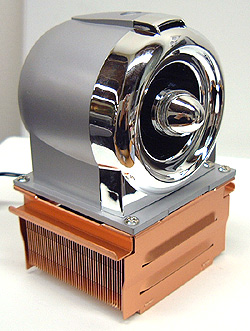
Posted: Thu Jun 23, 2005 12:31 pm
by navynuke04
Ummm.... I hate to break this to you, but that's not a CPU fan. That's a jet engine.
Posted: Thu Jun 23, 2005 1:41 pm
by Da_elf
honestly. you have something wrong with your computer if you need that kinda heat sink. hell. i have a dualAMD 2600+ system, a dual XEON 2.8ghz system and a dual AMD Opeteron 264 system and none of them go over an operating temperature of 45 degrees and i run them at 100% processor power 24 hours a day all the time without turning them off. and to top it all off i live in a hot humid tropical island.
Posted: Thu Jun 23, 2005 1:47 pm
by Charlemagne
Maybe Angelus is overclocking?
Posted: Thu Jun 23, 2005 2:22 pm
by Klytos
I can't get enough cool air into my computer. I have to leave the side off in summer and have a fan blowing into it.
Posted: Thu Jun 23, 2005 2:35 pm
by Quest For Glory Fan
You're not the only one I have a afan the exact size of my tower and it's been duct taped there for a few years now. Kind of a bitch if you need to get in there though.
Posted: Thu Jun 23, 2005 3:07 pm
by Da_elf
here is a nice little tip. alot of the times over heating is a bi-product of dust contamination. buy a can of compressed air and every 6 months or so give your heat sinks a good blast to clear the dust away from it
Posted: Thu Jun 23, 2005 4:42 pm
by Angelus3K
Half right Navy its a Jet Engine CPU Fan!! Its the Coolermaster Jet 4 or something its called.
I have the exact same problem as Klytos, our PC is fine all year round running 24 hours a day but when the hot summer weather kicks in it just reboots repeatedly untill it comes up with a Boot Error screen and just sits there.
I have to take the side panel off and have a fan sit there blowing on it and its fine.
And no I'm not over-clocking lol but with this beast if it does the job I will then think about over-clocking, its something I've never done but would be cool to try.
EDIT: When I get home just need to apply the thermal paste and stick it in and see what happens!!
Posted: Thu Jun 23, 2005 5:25 pm
by Blackthorne519
When my computer overheats, I just stick in in a large barrel of ice-water. That cools the sucker off right quick.
Course..... everything runs funny after that.......
Bt
Posted: Thu Jun 23, 2005 6:59 pm
by Da_elf
you might want to check your configuration again. somethings seriously wrong there if a p4 2ghz would overheat so easily. even if you have it turned on 24 hours a day unless your pushing the processor at 100% for all those 24 hours it shouldnt go above 40degrees
Posted: Thu Jun 23, 2005 8:47 pm
by navynuke04
Angelus, just be sure you computer doesn't go air born... Would be a shame if you came home and there was a big hole in the wall next to where your computer used to be.
Posted: Fri Jun 24, 2005 10:34 am
by Angelus3K
Lol @ navy.
Well I put the Jet Engine in and it STILL gets too hot and reboots. Maybe I'll have to look into other fans or water cooling or something.
I tried to install Asus Probe to check the CPU temp but it comes up with an lmcontrol procedure error...
I tried Motherboard Monitor but that doesnt give any readings it just says Case Temp = -128c and CPU Temp = -128c lol
I thought all P4's had temp diodes in them so I'm sure mine must have one.
And no when my computer is left on its just running BitTorrent downloading and Uploading stuff.
The same thing happend last year when I had a AMD Athlon 1.6GHZ which eventually burned out and the temp monitor on that was hitting 70c+ whenever I played a game and would restart.
Posted: Fri Jun 24, 2005 12:47 pm
by navynuke04
Do you have your computer set in an enclosed cabinet? Do you have any pets that might be getting hair into the fans and heatsink? My mom blew out a monitor because her cat loved to sit on top of it. She also lost the computer because she left the doors shut while it was running and it overheated.
Posted: Fri Jun 24, 2005 12:58 pm
by Klytos
somethings seriously wrong there if a p4 2ghz would overheat so easily.
I donno. Mines only a 1.2ghz and I have that problem.
Posted: Fri Jun 24, 2005 1:30 pm
by Da_elf
i honestly wouldnt buy from that store anymore hehe. whats the usual ambient temperature of your room up there? and are you sure its rebooting because of heat? sounds more like a faulty chip if so, especially with that jet engine on there and your still overheating. The thermaltake fans ive got on my xeons and amd's are more or less standard. nothing fancy.
Posted: Fri Jun 24, 2005 9:02 pm
by Angelus3K
Like I said it must be heat, when I put a normal household fan against the open case the system runs fine.
We do have a dog but I think the problem is that the PC is in a corner with hardly any air circulation. Still I would of thought a normal fan would have been able to keep it cool enough.
Its fine all year round so it must be the summer weather.
I think what I need to do is get some temp monitoring software working and see what temp the CPU is hitting to make it reboot.
Otherwise I'm on the lookout for a better fan, I think this fan is more show as it looks like a Jet Engine and its description goes on about how powerful it is but putting my hand near it you can hardly feel a breeze, its just like a normal fan not what you'd expect from a "jet engine" so I think I need a fan that actually blows some air around!!
Posted: Fri Jun 24, 2005 9:35 pm
by navynuke04
Well, at least you have a good start on making a model jet plane.

Posted: Sat Jun 25, 2005 5:20 pm
by MuzlakOofmay
If you don't have any front or rear fans in your machine, that new fancy cpu fan won't do you anything. Also, I think having a top fan is really nice, as heat rises, and it helps the hot air inside escape out top.
Posted: Sat Jun 25, 2005 6:12 pm
by navynuke04
MuzlakOofmay wrote:If you don't have any front or rear fans in your machine, that new fancy cpu fan won't do you anything. Also, I think having a top fan is really nice, as heat rises, and it helps the hot air inside escape out top.
True. If you don't bring in fresh air, all that fan will do is circulate the already hot air.
Posted: Sun Jul 10, 2005 2:00 pm
by El_Listo
I think im a bit late on this one. If you haven't removed it yet try punching it hard.
Posted: Mon Jul 11, 2005 3:53 am
by Quest For Glory Fan
ya, that was a pretty late arrival. this thread was last spoken on 3 days before you joined. Did you get it working Angelus? and is the fan bigger than your head?
Posted: Mon Jul 11, 2005 7:04 am
by Angelus3K
The fan works, but is not good enough so I'm looking for a better fan.
Can anyone suggest a GOOD heatsink/fan?
Posted: Mon Jul 11, 2005 7:09 pm
by Parhelion
I've used the Jet fan, and it works as well as anything else. Actually, I can't imagine that temperatures are really the problem if you've installed that. I have had an Asus P4 motherboard where the heat sensor broke, and kept resetting. Then when it would come back on, it would say something about a "thermal event." In that case, the motherboard had to be replaced.
Also, don't expect to feel much of a breeze when putting your hand near that fan. The big jet engine part sucks the air down onto the copper heatsink part, and from there it just kind of escapes from every direction. It works well though, and should lower your temperatures quite a bit from a stock fan.